
Office Moves
An office move is the worst time for IT to fail. We handle your entire office IT infrastructure from planning to the first morning in the new space, either as your IT provider or working alongside your in-house IT team, so staff sit down on day one and everything works. We handle anything from equipment breakdown and setup to connectivity testing and relocating entire technology stacks.
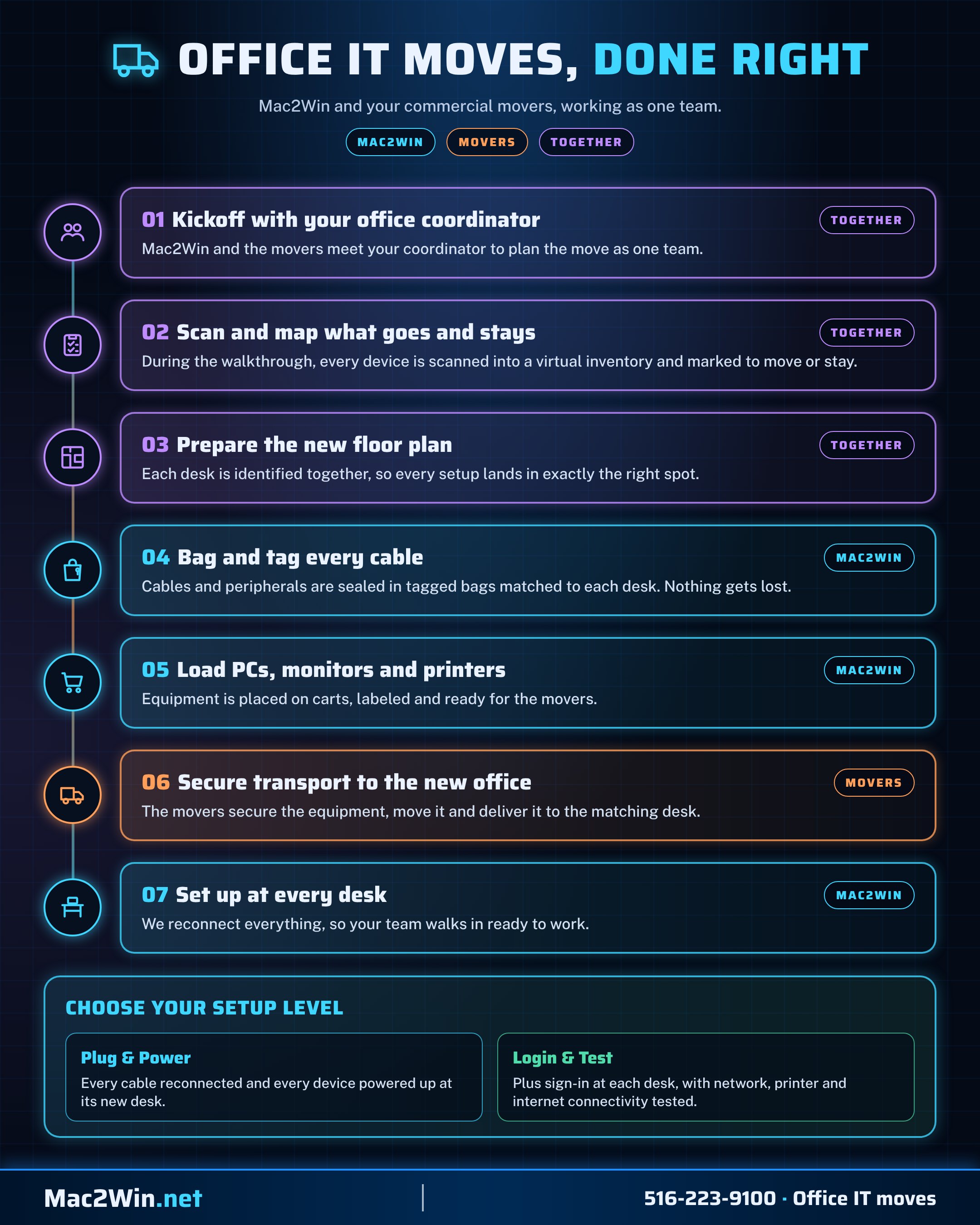
How we move your office IT
We work side by side with your commercial movers, so nothing gets lost between the old office and the new one and your team walks in ready to work.
- Plan together kickoff with your office coordinator, a scanned virtual inventory and a mapped floor plan
- Pack it right every cable and peripheral sealed in a tagged bag matched to its desk
- Hand off cleanly PCs, monitors and printers loaded on carts for the movers to secure and deliver
- Set up at every desk Plug & Power, or Login & Test with connectivity checked
- Your IT stays on the big picture we work alongside your in-house IT team and take the move off their plate, so they can stay focused on the projects that matter most
What we offer
Full or co-managed moves
- We run it end to end. As your IT provider, we own every technical part of the move, from the first site visit to day-one support.
- We support your IT team. Have your own IT staff? We add hands, planning and specialist skills so your team can keep the business running while the move happens.
- One coordinated plan. Whichever model you choose, everyone works from the same timeline, checklist and contact list.
- A single point of contact. One project lead for your management, movers, landlord, contractors and vendors.
Planning & site survey
- New space assessment. Power, data points, Wi-Fi coverage, server or network closet, cooling and physical security reviewed early.
- Floor plan mapping. Every desk, printer, display and access point placed on the plan before anything is ordered.
- Lead times built in. Internet circuits, cabling and equipment ordered early enough to be ready before move day.
- Budget and timeline. A written plan with costs, milestones and responsibilities agreed up front.
Internet, carriers & phones
- Internet circuits. Business internet and backup connections ordered, installed and tested before you arrive.
- Carrier coordination. We manage internet providers and phone carriers on your behalf, including the follow-ups.
- Phone systems. VoIP and Microsoft Teams Phone moved or set up, with number porting planned to avoid missed calls.
- Failover. A secondary connection so the office stays online if the main line fails.
Network infrastructure
- Structured cabling. Data cabling specified and installed by trusted contractors, then tested and labeled.
- Firewall and switching. Business-grade firewall and managed switches installed, configured and tested before desks move.
- Office-wide Wi-Fi. Access points placed for full coverage, with separate secure networks for staff and guests.
- Secure remote access. VPN and remote access confirmed working so remote staff and other offices stay connected.
- Connectivity testing. Every data point, wireless area, phone and internet link tested end to end before and after the move.
Tech stack relocation
- Entire tech stacks moved. Servers, storage, network gear, phone systems and line-of-business systems relocated as a complete, working stack.
- Safe shutdown and transport. Equipment shut down in the right order, packed and moved with care, then brought back up and verified.
- Racks and power. Equipment racks, battery backup (UPS) and cable management set up properly in the new room.
- Cloud continuity. Microsoft 365 and cloud services stay available throughout the move.
- Verified backups. A full, tested backup is taken before any equipment leaves the old office.
Breakdown, setup & AV
- Breakdown and setup. Every workstation, monitor and peripheral carefully disconnected and packed at the old office, then set up at its new desk.
- Labeled and tracked. Every computer, monitor and peripheral labeled to its new desk, so nothing goes missing.
- Printers and copiers. Printers, multifunction copiers and scan-to-email moved and reconfigured.
- Conference rooms. Displays, cameras and Microsoft Teams Rooms installed and tested for the first meeting.
Cutover with minimal downtime
- After-hours and weekend moves. Equipment moves outside business hours to keep disruption to a minimum.
- Pre-staged network. The new office network is live and tested before the old one is switched off.
- Rollback plan. A clear fallback for every critical system if anything doesn't go as planned.
- Live status updates. Management knows exactly where the move stands throughout the cutover.
Day-one support
- Technicians on site. White-glove technicians on site the first morning to help staff settle in.
- Desk-by-desk checks. Every desk, phone and printer confirmed working with its user.
- Fast fixes. Anything missed is fixed on the spot, not added to a waiting list.
- Follow-up visit. A check-in after the first week to resolve anything that came up.
Documentation & decommissioning
- Updated documentation. Network diagrams, equipment inventory and passwords recorded for the new office.
- Old site cleared. Equipment removed from the old office and any leftover services cancelled.
- Secure data destruction. Retired drives wiped or destroyed, with a certificate for your records.
- Responsible recycling. Old equipment disposed of through certified e-waste recycling.
How we achieve it
- 01
Agree the model
We confirm whether we're running the move end to end or supporting your in-house IT team, and who owns each task.
- 02
Survey and plan
The new space is surveyed early and a written move plan with timeline, budget and labeling scheme is agreed.
- 03
Order and pre-stage
Internet, cabling and equipment are ordered with lead times built in, and the core network goes live before move day.
- 04
Back up and pack
Everything is backed up and verified, then equipment is labeled, shut down and packed.
- 05
After-hours cutover
The move happens outside business hours, with every system tested against a checklist.
- 06
Day-one support and handover
Technicians are on site the first morning, and you receive updated documentation for the new office.