
Cyber Security
Most breaches at smaller organizations start with a stolen password, a phishing email, an exposed remote desktop or an unpatched laptop. We protect every layer, from the sign-in to the hard drive, and keep watching around the clock.
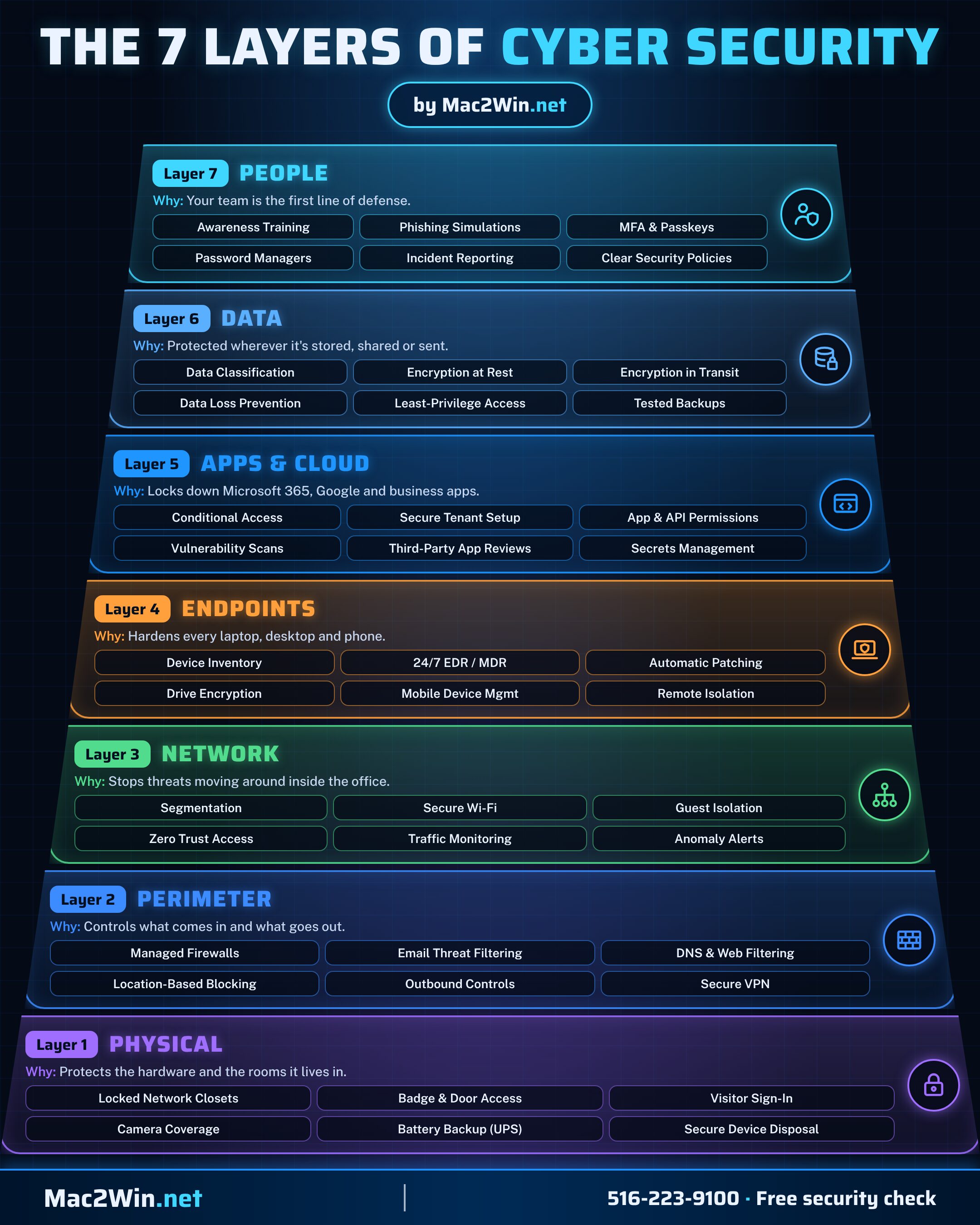
The 7 layers of cyber security
No single tool stops every attack. We protect your business in layers, so if one control is bypassed, the next one catches it.
- People training, phishing simulations and MFA
- Data encryption, data loss prevention and tested backups
- Apps & cloud secure Microsoft 365 and Google setups
- Endpoints 24/7 detection and response, patching and encryption
- Network segmentation, secure Wi-Fi and monitoring
- Perimeter firewalls, email and web filtering
- Physical locked closets, access control and power backup
What we offer
Endpoint detection & response
- Behavior-based detection. A lightweight agent on every Windows, macOS and Linux device watches what software actually does, catching attacks in progress such as suspicious PowerShell, process injection and misuse of built-in admin tools.
- One-click isolation. A compromised device can be cut off at the network, process or desktop level, stopping the spread while we keep remote access to investigate.
- Ransomware rollback. Files are protected by a background copy taken before changes are written, so data encrypted or deleted by ransomware can be restored to its state from up to seven days earlier.
- Clear, actionable alerts. Each detection explains what happened, on which device and what was done about it, instead of a flood of raw events.
24/7 managed detection & response
- Round-the-clock monitoring. Security analysts watch your endpoints 24 hours a day, 365 days a year, including nights, weekends and holidays.
- Investigation and triage. Alerts are investigated and correlated to judge severity and scope, so you only hear about confirmed threats.
- Hands-on response. Analysts can stop malicious processes, isolate devices and remove malware the moment a threat is confirmed.
- Proactive threat hunting. Analysts search for signs of compromise and new attack techniques before they trigger an alert.
- Incident reports. Plain-language reports of what happened, what was done and what still needs attention, ready for leadership, auditors and cyber insurers.
Brute-force protection
- Remote desktop defense. Repeated failed logins against Remote Desktop (RDP) are detected automatically and flagged as an intrusion attempt.
- Automatic blocking. Offending IP addresses are blocked on the device's own firewall, so password-guessing attacks stop at the door.
- Known-bad address filtering. Inbound connections from public IP addresses with a history of abuse are blocked before they reach a login screen.
Microsoft Defender
- Built-in protection, properly configured. Microsoft Defender Antivirus with real-time and cloud-delivered protection turned on and managed centrally, as a layer alongside our detection agent.
- Attack surface reduction. Rules that block common attack techniques, such as Office macros launching scripts or credential theft from system memory.
- Tamper protection. Security settings are locked so malware, or a curious user, cannot switch protection off.
- Defender for Office 365. Safe Links and Safe Attachments check links and files in email and Teams before anyone opens them.
Identity & Conditional Access
- Microsoft Entra ID. Every account managed in one directory, with single sign-on to Microsoft 365 and connected business apps.
- Multi-factor authentication. MFA on every account, with phishing-resistant methods for administrators.
- Conditional Access. Sign-in rules that check who, where and what device: require MFA, allow only compliant company devices, block legacy sign-in protocols and challenge risky sign-ins.
- Privileged account control. Separate admin accounts with the least access needed, reviewed regularly.
Geofenced two-factor authentication
- Push approval sign-in. Users approve logins with a tap on their phone, with a verified code match to stop fatigue attacks.
- Location-based policies. Access is allowed, challenged or denied by country, so sign-ins from places you don't do business are blocked outright.
- Trusted networks. Rules can relax prompts inside your office network and tighten them everywhere else.
- Device health checks. Devices with outdated operating systems or disabled security can be refused until they are fixed.
Device management with Intune
- Enrollment and setup. Company Windows PCs and Macs enroll automatically and receive standard security settings on first sign-in.
- Compliance policies. Each device is checked for encryption, updates, passwords and protection; non-compliant devices are blocked by Conditional Access.
- App and settings deployment. Approved software and configuration pushed centrally, with no visit to the desk.
- Remote lock and wipe. Lost or stolen laptops and phones can be locked or wiped remotely, protecting company data.
BitLocker drive encryption
- Every Windows drive encrypted. Windows BitLocker with hardware-backed (TPM) protection on every drive, so a lost laptop is a hardware loss, not a data breach.
- Recovery keys held centrally. BitLocker recovery keys are escrowed securely in Microsoft Entra ID and our management platform, so a locked-out user is back in minutes.
- Encryption monitoring. Any device that reports an unencrypted drive raises an alert and a ticket automatically.
Remote monitoring & management
- 24/7 device health monitoring. Every workstation and server reports disk, performance, security and backup status, with alerts that become tickets.
- Automated patching. Windows, macOS and third-party application updates approved, scheduled and installed automatically, with reports of what was applied.
- Scripted remediation. Common problems are fixed automatically by scripts before users notice.
- Secure remote access. Technicians connect to any managed device to fix issues without a site visit.
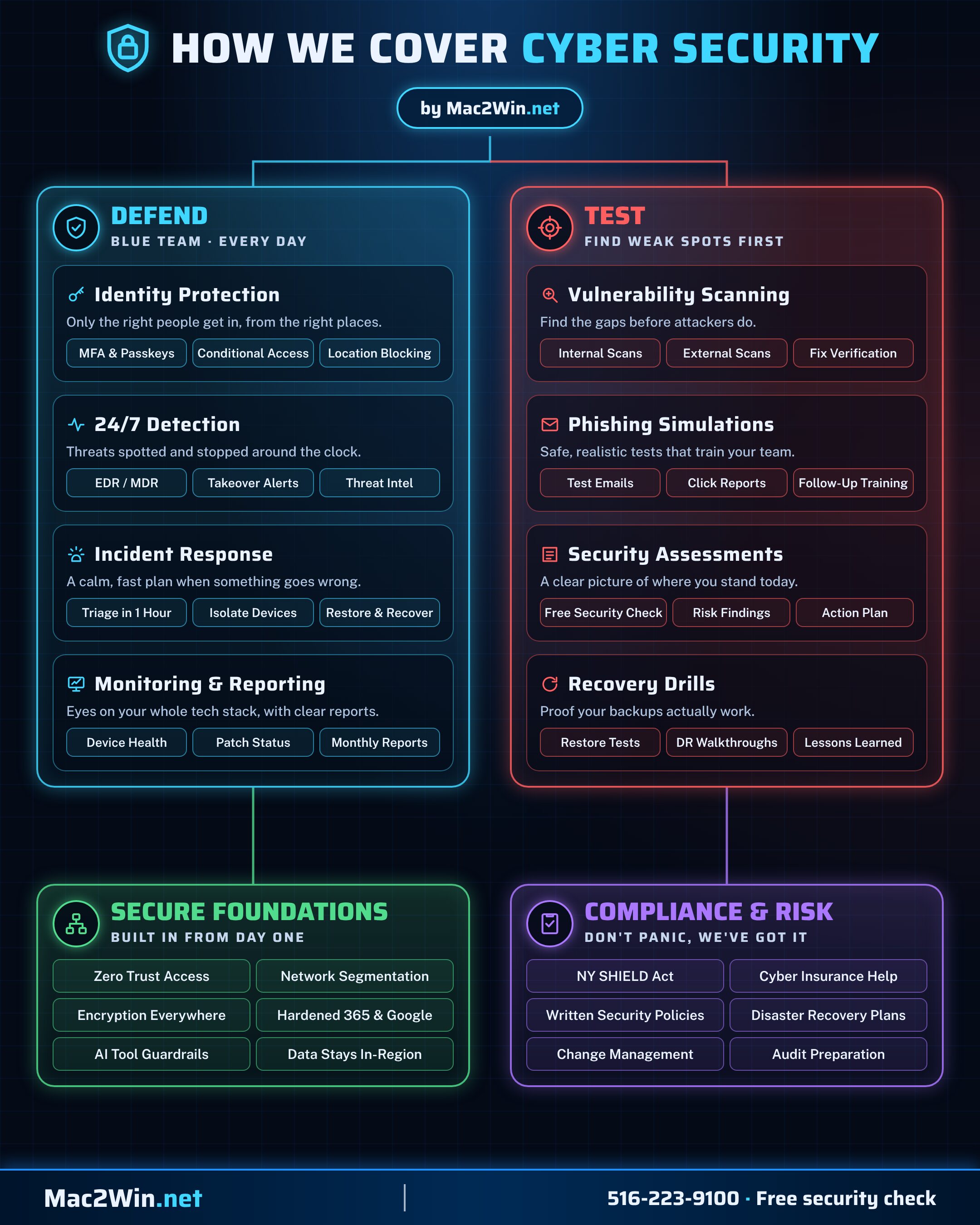
How we cover cyber security
Good security is two jobs at once. Our blue team defends your business every day, and we regularly test your defenses to find weak spots before attackers do.
- Defend identity protection, 24/7 detection, incident response and monitoring
- Test vulnerability scans, phishing simulations, security assessments and recovery drills
- Secure foundations Zero Trust, segmentation, encryption and hardened Microsoft 365 and Google
- Compliance & risk NY SHIELD Act, cyber insurance, policies and disaster recovery plans
How we achieve it
- 01
Security baseline
We review accounts, admin rights, devices, remote access and email settings, and score where you stand today.
- 02
Lock down identities
Entra ID, MFA, Conditional Access and geofenced two-factor go in first, because stolen sign-ins are the most common way in.
- 03
Protect every endpoint
Devices are enrolled in Intune, encrypted with BitLocker, and given Microsoft Defender plus our detection and response agent with brute-force blocking turned on.
- 04
Monitor around the clock
Analysts watch for threats 24/7 while our monitoring platform keeps patches current and flags drives or devices that fall out of compliance.
- 05
Respond and recover
Confirmed threats are contained quickly by isolating affected devices, and ransomware damage is rolled back.
- 06
Review quarterly
We re-score your posture and report what improved and what's next.